

Your UPSC
preparation.
Visualized.
Every test you take grows your garden and shows exactly where you stand.





Designed for
UPSC aspirants
Why gardens?
One glance.
Total clarity.
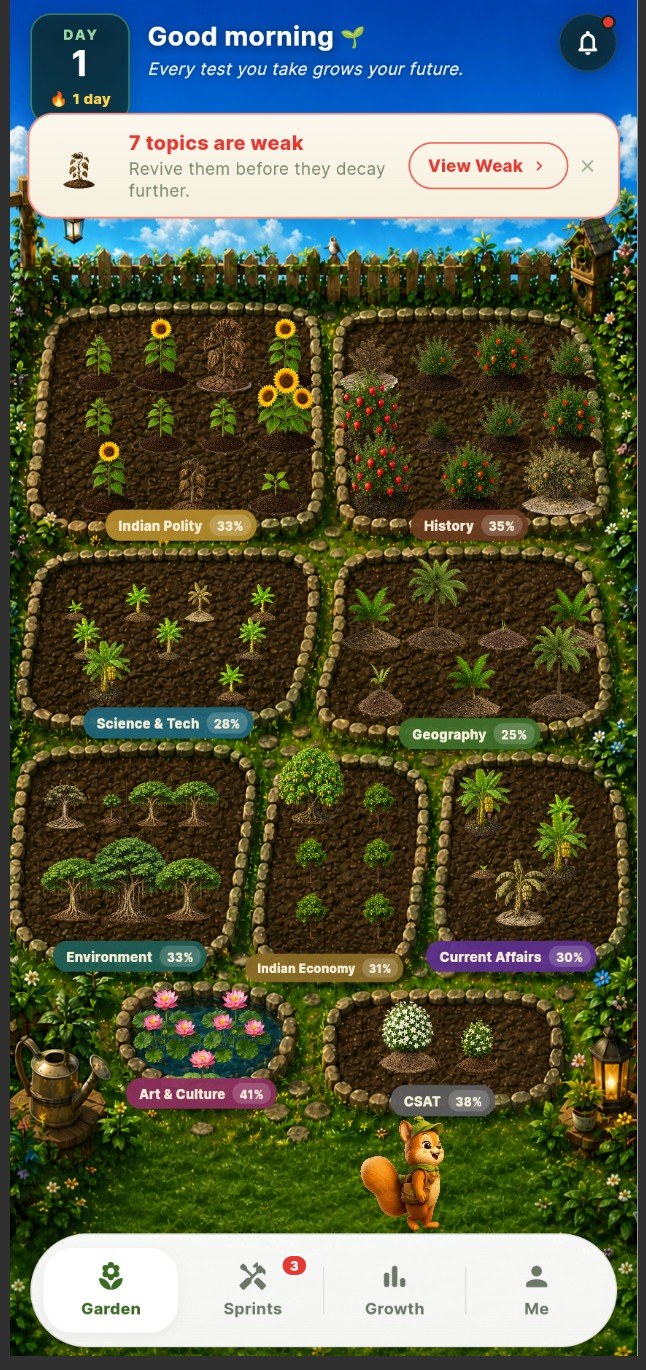
No more confusing charts and percentages. Your garden shows your true preparation instantly.

-

Healthy plants
show your strong concepts.
-
Live progress
every bed shows its score.
-

Withering plants
reveal weak topics.
-

Grow every plant,
build your forest.
Instant Clarity
Strong and weak topics, at a glance.
Right Focus
Spend time where it matters most.
Stay Consistent
Every test becomes visible growth.
Track Progress
Watch your journey, day by day.
Traditional Dashboards
- Many numbers, hard to interpret
- Too much information
- No clear direction
UPSC Garden
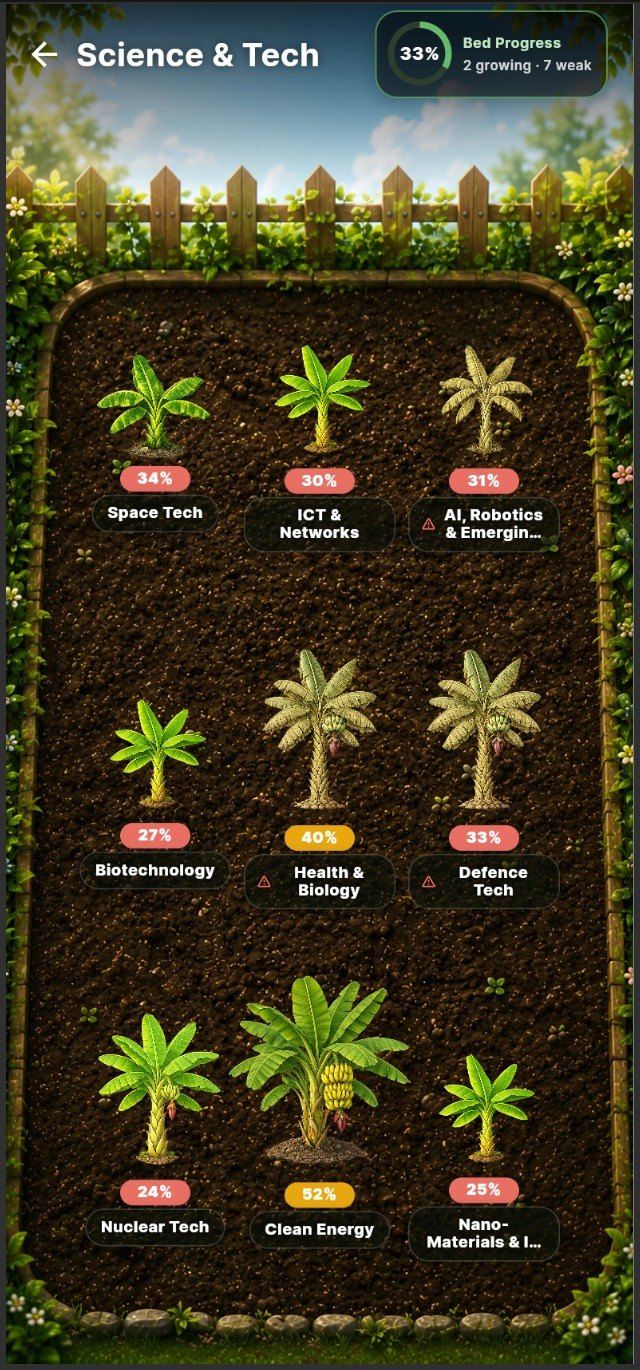
- Easy to understand, visual & simple
- Shows what matters at a glance
- Clear next steps, always
How it works
Every test changes your garden.

-

1Take a Test
Attempt tests across any subject.
-

2Get Evaluated
Correct and incorrect answers are analyzed.
-

3Garden Updates
Plants grow, wilt or need your attention.
-

4Know Where to Focus
Your garden shows what needs attention.
Nine subject gardens
Nine gardens. One goal.
Master every subject. Build your complete UPSC garden.
- Polity — flourishing82%
- History — weak35%
- Geography — growing71%
- Economy — on track63%
- Environment — growing59%
- Science and Tech — growing68%
- Art and Culture — needs focus41%
- Indian Economy — weak37%
- Current Affairs — stay updated61%
Tap any garden to see detailed insights.
Your journey, over time
Small steps today,
forest tomorrow.

- 9Subject Gardens
- Topic-levelTest Insights
- 7 or 14Day Recovery Sprints
- 1Clear Next Focus
Miss too many tests…
Your garden starts to fade.
Stay consistent. Your future self is watching.
Questions aspirants ask
Before you plant
your first seed.
UPSC Garden is built to make preparation status visible, memorable and easier to act on after every test.
How does UPSC Garden decide which plants grow or wither?
Your test performance is mapped to subjects and topics. Strong areas grow into healthier plants, while weak or neglected areas begin to wilt so you know where to revise next.
Is this only for Prelims, or does it help with Mains too?
The garden view is designed around UPSC preparation as a whole: subjects, topic strength, consistency and progress. Prelims-style tests are the clearest starting point, and the same visual system can support broader preparation tracking.
Do I have to study inside the app?
No. The core idea is to make your progress visible after tests. You can keep using your books, classes and notes; UPSC Garden helps you see what those efforts are producing.
What makes this better than a normal score dashboard?
Dashboards show numbers. UPSC Garden turns those numbers into a living picture, so patterns are easier to notice: strong subjects, weak topics, skipped practice and long-term consistency.
Will the app tell me exactly what to revise next?
That is the goal of the weak-topic system. When a topic underperforms, it becomes visually obvious, helping you choose revision work with less guesswork.
What are sprints in UPSC Garden?
Sprints are short recovery plans for weak topics in your garden. When a subject has withering plants, UPSC Garden can group those topics into a focused 7-day or 14-day plan with revision goals and tests. As you complete the sprint, your garden shows whether those plants are actually improving.
What happens if I miss tests for a while?
Your garden is meant to reflect consistency as well as accuracy. If you stop practicing, the experience can show fading or neglected areas so returning to the habit feels concrete.
Is it a replacement for coaching, notes or test series?
No. Think of it as a visual layer on top of your preparation. It helps you understand your progress and focus, while your study material and practice still do the heavy lifting.
When will the Android and iOS links work?
Android and iOS are preparing for launch. Each badge will link to its official listing as soon as that listing is available.